Sites (Tower Locations)
Create and manage the tower locations your coverages are built from.
What is a Site?
A Site is a saved tower location (latitude/longitude, height, and grouping). Coverages, links, and radio systems reference sites so you don't re-enter coordinates.
Add a site
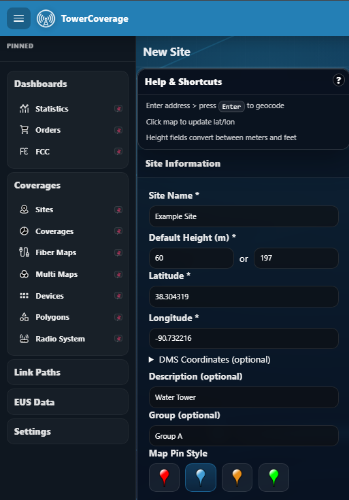
To create a site, select Site >> New from the left side navigation bar. This will bring you to the new site creation page. This page allows you to create a site and define default values for that site.
There are two ways to find your site’s location:
1.) GPS Location: Simply enter your Latitude/Longitude coordinates. If you have the Degree/Minute/Seconds GPS format, you can enter it in that format and the site will convert it to the decimal method for you.
Remember that if the location in in the Southern Hemisphere, the Latitude will be a negative value and the Longitude will be negative for the Western Hemisphere.
2.) Address Search Feature: This allows you to enter an address, and the website will find the geo location for that address. This is not perfect though; you typically will have to view the map, zoom in and verify that your pin is on the tower. You can also move the pin around the map, however, please ensure the bottom of the pin is on the exact location for your site.
Now that you have the location, please name the site and enter the default height. (These fields are required and you cannot create a site without them.) TowerCoverage.com stores the default height in Meters, but you can also enter it Feet and the site will convert to Meters for you.
Optional Fields: including a description of the site and/or group name for future sorting.
Import & export
- Import Sites — bulk-load sites from a spreadsheet.
- Download CSV — export your site list.